

In today's fast-paced world, effective time management is crucial, especially for businesses looking to streamline appointment and meeting scheduling. A reliable calendar scheduling tool plays a pivotal role in enhancing productivity by reducing the back-and-forth of booking meetings. Both Cal.com and Calendly offer solutions that address these needs, but with different features and approaches. As businesses increasingly rely on digital tools for remote operations, selecting the right scheduling software becomes essential for maintaining smooth and efficient workflows.
Feature Comparison: Cal.com vs. Calendly
When evaluating Cal.com and Calendly, it’s clear that both platforms are designed to simplify scheduling, yet they achieve this goal through a mix of shared core features and unique functionalities that cater to different user needs. There are similarities and differences in the features offered by Cal.com and Calendly, including unique and shared functionalities.
Key Features of Calendly
User Interface and Ease of Use
Known as a user-friendly calendar scheduling tool, it boasts a clean, intuitive interface that streamlines scheduling for both beginners and seasoned users. It simplifies appointment scheduling by allowing users to pick from predefined slots that the organizer has marked as available. This direct approach eliminates the typical back-and-forth often associated with scheduling meetings. Its ease of setup and minimal learning curve make it an attractive calendly alternative for individuals and businesses seeking efficiency without the hassle of complex configurations.
Calendar Integrations and App Compatibility
A major strength of Calendly lies in its extensive calendar integration capabilities. It seamlessly syncs with major calendar services such as Google Calendar, Outlook, and iCloud, ensuring that users can manage all their appointments without double-booking. Beyond calendars, Calendly integrates well with various apps and services that enhance productivity, such as Zoom, Salesforce, and Slack, making it not just a scheduling tool but a comprehensive ecosystem that supports a wide range of business activities.
Scheduling and Reminders
Calendly excels in automated scheduling tools, offering features that automate nearly every aspect of the booking process. Once a meeting is scheduled, it automatically sends confirmation emails and timely reminders to both the host and the attendees. This automation ensures all parties are well-informed and significantly reduces the no-show rate. These reminders and confirmations can be customized, adding a personal touch to the otherwise automated communication.
Customizable Booking Links
With the wide range of customization possibilities Calendly offers, users may design booking links that complement the style and language of their business. Such a feature is particularly useful for professionals who wish to maintain a consistent brand image across all touchpoints. Users can personalize their scheduling pages with logos, color schemes, and personalized text, making Calendly not just a functional tool but also a part of their branding strategy.
Key Features of Cal.com
Open-Source Flexibility
Cal.com stands out as an open-source calendly alternative, offering unparalleled flexibility for users who need deep customization. Its open-source nature allows developers to access the codebase, enabling them to tailor the software to specific requirements that proprietary tools often cannot accommodate. Cal.com’s architecture was built for builders. A platform that embraces open standards and encourages customization. Developers can compose, extend, or integrate scheduling workflows without workarounds or limitations.
“Developers shouldn’t have to hack around scheduling APIs. That’s why we made ours open, composable, and ridiculously flexible.”
— Peer, Founder
Flexibility proves essential for businesses with unique workflow needs or those looking to integrate highly specialized internal systems. As a result, it appeals not just as a scheduling solution but as a customizable platform that adapts to complex business processes. Their strength also lies in their robust integration capabilities with a variety of business tools. It supports integration with major calendars, CRM systems like Salesforce, and video conferencing tools such as Zoom and Microsoft Teams. This connectivity ensures that Cal.com operates not in isolation but as part of a cohesive business ecosystem, streamlining workflows and enhancing productivity across different departments.

Self-Hosting Capabilities
For organizations concerned with data sovereignty and security, Cal.com offers significant advantages with its self-hosting capabilities. This feature allows businesses to host the scheduling system on their own servers, giving them full control over their data and ensuring that it remains within their corporate environment. Such a level of control is particularly valuable for companies in industries with strict compliance and privacy regulations, making Cal.com a compelling choice for those who prioritize security over convenience.
Unique Features and Plugins
This platform not only supports basic appointment settings but also extends its functionality through various plugins that cater to niche business needs. Here are several notable enhancements that Cal.com offers:
- Custom API Integrations: For advanced users, this capability means they can link Cal.com with various tools, from customer relationship management (CRM) systems to project management platforms, creating a synchronized and efficient workflow. These API integrations allow businesses to streamline data flow, ensuring that appointment information, customer data, and other essential details move smoothly between platforms. With these custom APIs, users can automate several functions, reducing the need for manual data entry and improving operational efficiency.
- Advanced Analytics Plugins: Cal.com’s advanced analytics plugins provide in-depth insights into scheduling activities, which are essential for data-driven decision-making. These plugins allow users to generate reports detailing booking patterns, peak scheduling times, and user behaviors. For businesses, this data is invaluable for understanding customer preferences, optimizing scheduling, and predicting trends. Detailed analytics also help in resource allocation, ensuring teams and spaces are utilized efficiently. By offering access to real-time insights and historical data, this platform equips users with the knowledge to refine their operations, enhancing the platform’s value as a comprehensive scheduling tool that aids strategic planning.
- Enhanced Customization Options: Businesses can modify the visual aspects of their booking pages to match their brand’s identity, from colors to layout. The platform also supports complex multi-step booking processes, allowing users to create a tailored journey for clients, incorporating custom fields, specific instructions, or multi-service selections. Customization enhances the client’s booking experience by providing a unique, professional, and branded interface that sets businesses apart. For companies looking to deliver a distinctive customer journey, these customization options make Cal.com an ideal choice.
- Smart Scheduling Algorithms: Its smart scheduling algorithms offer advanced users a way to optimize their time management beyond basic availability checks. These algorithms consider factors such as travel time between appointments, personal preferences, and even priority levels, helping users construct the most efficient daily schedules. For users managing complex itineraries or client meetings across different locations, these smart algorithms are particularly beneficial, reducing the risk of overbooking or scheduling conflicts.
- Automated Payment Processing: With integrations to various payment gateways, clients can complete transactions at the time of booking, streamlining the payment process and reducing no-shows. This feature is particularly useful for service providers, coaches, and consultants who require upfront payments to secure appointments. By automating payment collection, Cal.com ensures a hassle-free experience for both the client and provider, eliminating the need for follow-up invoicing and allowing businesses to focus on delivering quality service.
The degree to which users can customize scheduling workflows and adapt the platforms to their specific needs is crucial. The commitment to providing a versatile, open-source calendar booking system is evident through its extensive customization options and advanced user features. This not only makes it a powerful open-source alternative for scheduling but also a tool that can evolve with the growing demands of modern businesses.
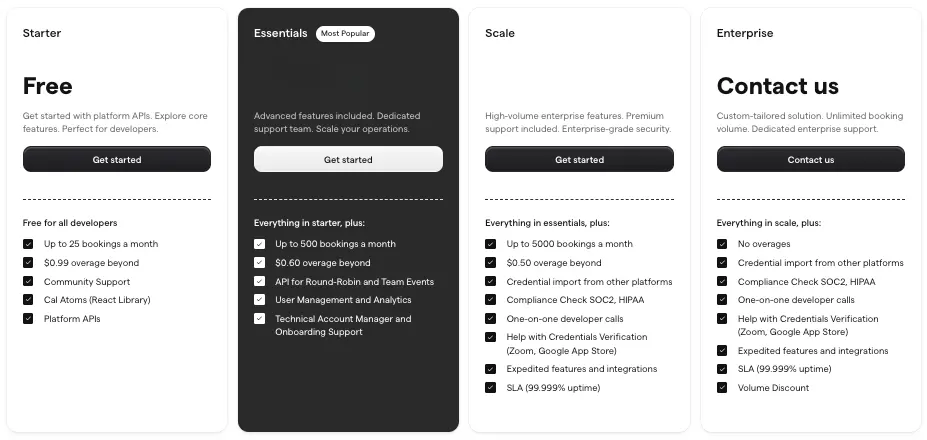
Pricing Comparison: Cal.com vs. Calendly
The pricing structures, available plans, and value propositions of both Cal.com and Calendly.
Free Plans and Included Features
Calendly’s free plan allows for unlimited one-on-one meetings, which is ideal for freelancers or consultants. In contrast, Cal.com provides a bit more flexibility with its free offering, including the ability to manage multiple event types. Small businesses that need to manage a range of meeting formats without incurring any upfront expenses may find this especially helpful.
Paid Plans
There are various integrations each platform offers, such as calendar services, CRM tools, and other third-party applications. As businesses grow, their needs become more complex, necessitating more robust features that are typically found in paid plans. Calendly’s premium versions start at $8 per user per month when billed annually, providing features like group events, customizable notifications, and integration with Salesforce. Cal.com’s paid tiers also begin at a competitive rate but offer the additional benefit of more extensive customization and integration capabilities, making it a strong contender for businesses looking for a Calendly alternative with open-source features.
The Best Value for Solo Users
Solo entrepreneurs and individual users often seek the best value for their investment. Calendly is a popular choice due to its simplicity and efficiency in handling straightforward scheduling needs. However, for those who require more control over their scheduling environment, Cal.com's open-source model provides a significant advantage, allowing deeper system modification and potential cost savings in the long term.
Pricing Considerations for Teams
When evaluating a scheduling tool for businesses, it's crucial to consider both the direct costs and the broader implications of the tool's features on operational efficiency. Here’s a breakdown:
- Volume Discounts: Both offer volume discounts, which can make a significant difference for larger teams. Calendly provides standard tiered discounts as the number of users increases, offering predictable savings for expanding teams. Cal.com, however, leverages its open-source model to provide additional cost advantages. Larger organizations, particularly those with IT infrastructure to support self-hosted options, can benefit from Cal.com’s adaptable pricing structure and open-source flexibility. This approach not only lowers licensing costs for large deployments but also opens the door for customized solutions that fit specific business requirements, ultimately enhancing operational efficiency.
- Feature Access: Calendly’s tiered plans give businesses progressive access to features, allowing them to upgrade as their needs evolve. Cal.com, however, tends to include more in-depth customization options even at comparable price levels. With exclusive plugins and extensive modification capabilities, Cal.com becomes an asset for tech-focused teams that need tailored booking flows and integrations with proprietary tools. Businesses that rely on advanced functionality, such as API access and enhanced scheduling workflows, may find Cal.com’s pricing model advantageous, as it allows access to these sophisticated features earlier.
- Long-Term Cost Benefits: Investing in an open-source scheduling tool like Cal.com offers cost-saving potential over the long term, especially for organizations that plan to leverage the platform beyond basic scheduling. Cal.com’s open-source structure allows businesses to build custom solutions and optimize various aspects of their operations, reducing dependence on third-party services. For businesses with in-house technical expertise, this flexibility translates into decreased subscription fees as they gain more control over the tool’s configuration. The capacity for self-hosted implementations and in-depth modifications means Cal.com can adapt to growing business needs without the expense of continuous upgrades.
- Total Cost of Ownership: When evaluating the true cost of a scheduling tool, businesses must consider the total cost of ownership, which includes not only subscription fees but also costs related to implementation, training, and ongoing adjustments. Calendly’s simplicity results in quicker adoption with less need for extensive setup, making it more accessible for teams without dedicated IT resources. Cal.com, being open-source, often requires a more hands-on approach at the outset, including setup, customization, and potential support. However, for companies prepared to invest in the initial configuration, the long-term savings from minimized licensing costs and in-house management can make Cal.com more cost-effective overall.
For businesses evaluating scheduling software pricing, these considerations are essential to finding a solution that not only fits their budget but also aligns with their strategic goals. Both Calendly and Cal.com offer distinct advantages depending on the specific needs of the business, whether those needs center on straightforward scheduling, extensive customization, or cost efficiency in the face of rapid scaling.
Calendar Tool Security Measures
Each platform supports security features and compliance standards, such as HIPAA and SSO.
Data Protection Policies and Encryption
Calendly places a high emphasis on security with robust data protection policies that ensure user data is handled with the utmost care. Their use of strong encryption methods for data in transit and at rest helps safeguard sensitive information against unauthorized access. Maintaining user trust requires this security structure, particularly in sectors where confidentiality is critical. It also adheres to rigorous compliance standards, including GDPR, to ensure that it meets the highest levels of security and data privacy requirements. This commitment is reflected in their regular security audits and certifications that validate their processes and systems. For businesses concerned with compliance, Calendly’s proactive approach provides a layer of reassurance that their data handling practices are up to date with current regulations.
Open-Source Transparency
In contrast, Cal.com offers a unique proposition with its open-source platform, which inherently supports a high level of transparency not always available in proprietary tools. The open-source nature allows users and independent security experts to review the source code, which can lead to quicker identification and resolution of potential security vulnerabilities. As mentioned previously, the ability to self-host the application provides businesses with the opportunity to enforce their own security measures and compliance protocols tailored to their specific needs. This makes Cal.com particularly appealing to sectors like healthcare and finance, where data privacy is critical and regulatory compliance is complex.
Collaboration and Team Features
Team Scheduling and Resource Management
Calendly's design facilitates seamless team scheduling and resource management, streamlining coordination of meetings among team members. Its features include collective availability displays, which allow teams to find common open slots effortlessly, minimizing the time spent on scheduling. Additionally, Calendly offers centralized management tools that enable administrators to oversee team schedules, ensuring optimal resource allocation and preventing overbooking. This is particularly beneficial for large teams with complex scheduling needs.
Usability for Remote Teams
The rise of remote work has necessitated a scheduling tool for remote teams. As emphasized before, Calendly’s straightforward interface and reliable synchronization with multiple calendar types simplify the process for remote teams, ensuring that members in different time zones can coordinate without confusion. Cal.com offers further benefits by allowing remote teams to tailor the tool to fit their unique workflows, which can vary widely across global teams.
User Experience
The usability, design, and overall user experience provided by Cal.com and Calendly are different, as discussed. Both Cal.com and Calendly deliver streamlined scheduling experiences, but take notably different approaches in usability and design.
Customer Feedback and Reviews
The experiences and opinions of users who have used Cal.com and Calendly highlight their strengths and weaknesses. When evaluating Cal.com and Calendly, user feedback provides invaluable insight into each platform’s real-world performance, strengths, and areas for improvement. Many Cal.com users praise its modern, intuitive interface and the flexibility offered by its open-source foundation. The ability to customize it extensively and self-host their scheduling infrastructure, which is especially appealing to businesses with technical resources or strict data privacy requirements. They also have responsive customer support and the platform’s rapid onboarding process, with some users noting that switching from competitors was seamless and efficient. Calendly, on the other hand, is widely recognized for its ease of use and reliability. Customer service can be less accessible, particularly for those on paid plans. Despite these minor weaknesses, Calendly’s broad adoption and generally positive reviews make it a favorite for individuals and teams seeking a no-fuss, dependable scheduling solution. User experiences suggest that Cal.com excels for those needing advanced customization and control, while Calendly stands out for its simplicity and ready-to-use efficiency.
Intended Audiences and Ideal Use Cases
There are intended audiences for each tool and scenarios in which they are most suitable. Cal.com is best suited for technical teams, enterprises, and organizations that require deep customization, data sovereignty, or integration with specialized internal systems. Calendly excels for solo professionals, consultants, small businesses, and teams seeking a quick, user-friendly solution with minimal setup.
Salesforce Integration
Cal.com’s Salesforce integration allows teams to bridge scheduling and CRM workflows seamlessly. By connecting booking data directly with Salesforce, every meeting, lead, or client interaction is automatically logged, reducing manual entry and ensuring accuracy across pipelines. Sales and support teams gain real-time visibility into customer engagement, enabling them to follow up more quickly and deliver more personalized outreach. The integration supports two-way data sync, so updates made in either platform reflect instantly in the other, keeping records current and eliminating communication gaps. Custom mapping options let businesses tailor the integration to their workflows, whether tracking event types, assigning reps, or triggering automations based on meeting outcomes. This unified system turns scheduling insights into actionable data that drives conversions and customer retention. For organizations using Salesforce as a central hub, Cal.com becomes an intelligent extension of their CRM, streamlining operations from the first booked meeting to the final closed deal.
Frequently Asked Questions
To help you make an informed decision between Cal.com and Calendly, here are answers to some of the most common questions about choosing the right scheduling tool for your needs.
What are the main differences between Cal.com and Calendly?Cal.com is open-source and highly customizable, ideal for technical teams. Calendly is user-friendly and ready-to-use, best for individuals and teams seeking simplicity and fast setup.
Who should choose Cal.com?Cal.com is best for organizations needing deep customization, data control, or self-hosting—especially those with technical resources or strict compliance requirements.
**Who should choose Calendly?**Calendly is ideal for solo professionals, consultants, and teams wanting a straightforward, reliable scheduling tool that works out of the box with minimal setup.
Which platform offers better value for teams?Cal.com provides cost advantages for large, tech-savvy teams needing customization. Calendly offers predictable pricing and easy onboarding for teams focused on efficiency.
**How do both platforms handle integrations?**Calendly offers broader, ready-made integrations, while Cal.com allows for deeper custom integrations, especially valuable for businesses with unique workflows.
**Is security and data privacy a concern?**Both platforms meet high security standards. Cal.com’s self-hosting and open-source transparency provide extra assurance for privacy-focused organizations.
**What should I consider before choosing a platform?**Assess your team’s technical skills, need for customization, integration requirements, and long-term growth plans to select the platform that aligns best with your business goals.
Choosing a scheduling software involves more than just comparing features; it requires a strategic assessment of how the best scheduling tools fit into your broader operational ecosystem. Each tool has its strengths and ideal use cases, and the right choice will align with your company’s workflow, technical capabilities, and growth objectives. Overviews, final thoughts, and guidance on choosing between Cal.com and Calendly based on the analysis presented. Consider your team's specific needs, the desired level of integration with other tools, and the potential for scalability when making your decision. This thoughtful approach will ensure that the scheduling tool you choose not only fits your current needs but also supports your future growth. Streamline your scheduling process and experience the power of open-source flexibility, and get started with Cal.com today.